IAN WICENSKI
MEDIAPIPE
INTERACTIVE
My introduction into hand-tracking interactive artwork in Touchdesigner.
What's The Goal?
To build a real-time interactive motion piece using my webcam and MediaPipe in Touchdesigner.
01
Getting familiar with Mediapipe
1A
First steps
I began this project following along with a wonderful tutorial series posted on Youtube by Torin Blackensmith. The first of the three part series can be found here.
On the right is a screenshot of my node structure while getting started. The MediaPipe node communicates webcam input to the hand_tracking node, which turns the video into data I can use via the nodes on the right. Notably, the clamp_math node allowed me to reference specific hand-tracked data.

1B
Initial Function
Setting up animated elements that respond to hand movement.
After following along with Torin's videos I was getting the hang of managing the nodes and parameters that were new to me. The next big milestone was to get something moving!
Here you can see a couple of simple lines bound to the tips of my pointer fingers and thumbs. These points are taken from the data in the CHOP node on the left side of the gif. Unfortunately, I cannot find a way to upload a higher resolution gif at this time so the data itself in this shot is illegible, but the important thing to notice is how there are a few key bars that move in sync with my hand movements.

1C
Tutorial Result
After a couple days work I was able to get through all three parts of the Torin Blackensmith hand tracking demo series. I ended up replacing the words and images to make it a bit more my own.
The hand you see on the right controls the transition between the two words while the hand you see on the left is what the visuals are responding to. The distance between my fingertips amplifiess the zoom and ripple effects.

02
Building Functionality
I wanted to build a simple game using what I learned. The game would involve a user guiding an aiming point with their hand in order to shoot down an attacking alien spaceship.
The style of the project was inspired by arcade classics like Missile Command and Galaga. As fun as the visuals are, it's important to start with a working foundation. This involved modifying what I had just created to respond differently. I started with the user's aiming reticle. This uses all the same fingertip distance and rotation data but with a different visual.

After adding the cursor it was most important to focus on proper interaction between it and the target. I put together a simple rectangle TOP with some noise CHOP's directing it's x, y coordinate position.
I followed along with a video demo about how to make 2D object collision work in Touchdesigner. That tutorial can be found here. Below is a simple gif of the demo result in action. You can see when the yellow cursor moves into either shape, the background changes color.

I made the 2D collision feature work in my own original project file. In the gif on the right you can see the small triangle in one TOP moving in response to my hand.
Most importantly you can see the circle TOP all the way on the right side flashing red and white. This happens due to the "merge1" CHOP and "logic1" CHOP above everything. Using the merge node, I can take the 2D collision data in as one channel and then I can take my hand-tracked rotation value as a second channel. The logic node receives those as conditions to be met before acting as a switch between 1 and 0. Coming back to the circle on the right, when that logic node switches to a value of 1, the circle turns red. This is proof of concept for the function of my interactive piece, now to add the visual.

03
Implementing Visual Design
As I had said previously, I was inspired by retro game visuals. I designed a classic, stereotypical UFO to be the enemy of my minigame.
Here is the asset in it's vector form as seen in after effects. Admittedly I had a decent amount of trouble capturing an authentic feeling pixelated look. Due to my time constraint I decided to just roll with my vector version. My next step was adding the explosion.
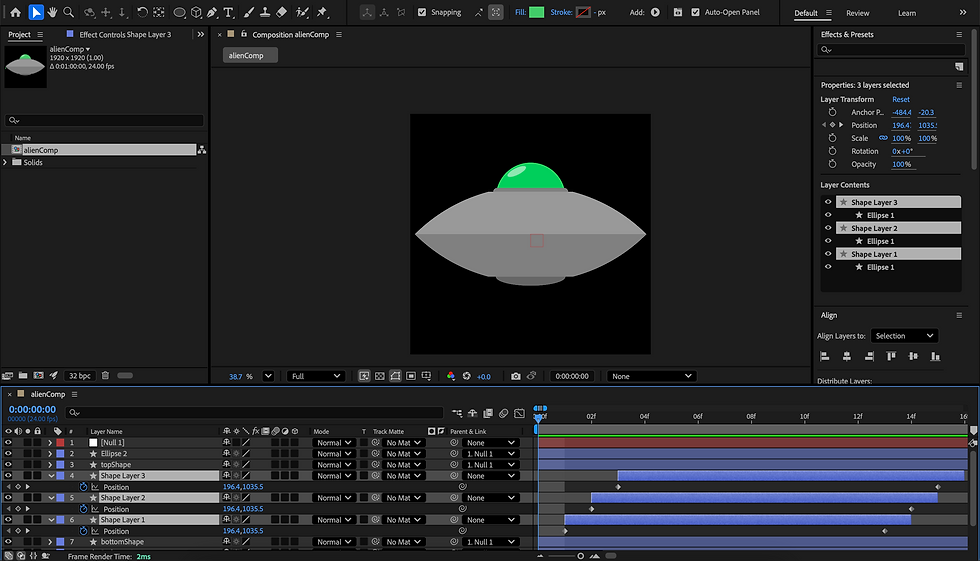

I kept it simple by using an explosion video on a transparent background. I played with the effects on its layer and landed on this interesting low resolution look. I think I could tie it together with a more retro looking UFO in the future!
The idea is simple, I have a gif of the UFO on it's own and then a gif of the UFO exploding with it's pixelated fade-out effect.
Next you'll see it in action as seen in Touchdesigner.
This is my node structure in charge of translating the interactivity into visual feedback.
As you can see, there is come jittering on the animation when my hand is still rotated after the explosion gif finishes. I unfortunately ran out of time to solve this problem during the project timeline but this could be fixed by adding an expression node leading into a count node. This would give me control over the amount of time it takes for the regular UFO gif to reappear, as well as the amount of times the explosion gif could play while my hands rotation value is greater than 180 degrees.

07
Final Result
I'm going to take the time here to say I am still not very familiar with using Wix in a streamlined way as of making this project, and I am quite unhappy with how it functions as a web hosting service. I have a higher resolution .mov file of this gif which I would love to include but I will have to wait until a later date when I either get some assistance in doing so on Wix, or move to another platform for a more polished website.
In the end I wouldn't say I quite hit my original vision but I learned an immense amount in basic hand tracking and basic python coding using expression nodes and logic nodes. This project was fun and I look forward to putting more energy into future Touchdesiger interactive pieces! Thank you for taking the time to read through my case study.
